Ever wonder why a crypto wallet can be compromised and what you can do to keep your assets safe? This article explains the mechanics behind wallet hacks, the role of private keys, and practical steps you can take to protect your holdings.
The plain explanation
A crypto wallet is a software tool that stores the private key needed to authorize transactions on a blockchain. The private key is a long, random string of characters that proves ownership of the associated public address. Anyone who obtains this key can move the funds without any further permission.
There are two main types of wallets: custodial wallets, where a third‑party service holds the private key on your behalf, and non‑custodial wallets, where you control the key yourself. Non‑custodial wallets can be further divided into software wallets (desktop, mobile, or browser extensions) and hardware wallets (physical devices that keep the key offline.
Security failures usually occur when the private key is exposed. This can happen through phishing attacks, malware that logs keystrokes, insecure storage (e.g., plain‑text files), or by importing the key into a compromised application. Once the key is known, an attacker can broadcast a transaction that transfers the assets to an address they control.
A real example
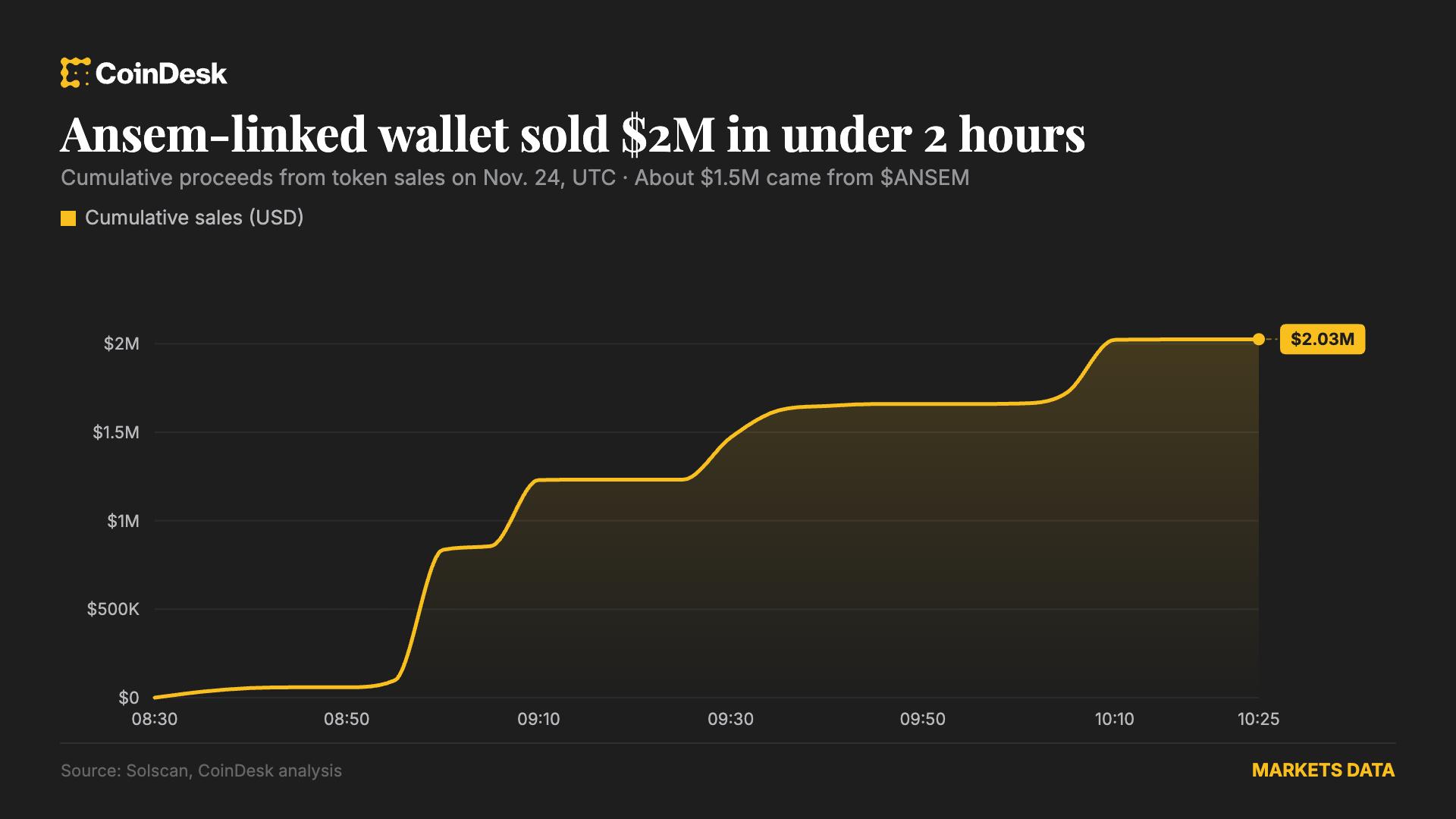
In March 2026, crypto trader Ansem reported that his wallet was hacked and $2 million worth of memecoins were sold. Ansem believes the breach occurred on Bullpen, a trading terminal he co‑founded, after the wallet’s private key was imported into the platform. The incident illustrates how importing a key into a potentially vulnerable service can expose it to theft.
What it means for you
If you use a trading terminal, exchange, or any third‑party app that asks you to import a private key, you are effectively giving that service full control over your funds. Should the service be compromised, your assets can be moved without your consent. This risk is especially high for high‑value holdings or for tokens that are easily tradable, such as memecoins.
Even reputable platforms can become targets for attackers. Relying solely on the platform’s security measures is not enough; you should assume that any place where the private key is stored or entered could be a point of failure.
What to check / how to judge
- Use non‑custodial wallets for long‑term storage. Keep the private key offline in a hardware wallet or a secure paper backup.
- Avoid importing private keys into third‑party apps. Instead, use the app’s native integration (e.g., API keys with read‑only permissions) whenever possible.
- Enable two‑factor authentication (2FA) on any account that can move funds, and use authenticator apps rather than SMS.
- Check the security reputation of the service. Look for independent audits, bug bounty programs, and a history of transparent security practices.
- Keep software up to date. Regularly update your operating system, browser, and any wallet applications to patch known vulnerabilities.
- Use separate wallets for trading and saving. Keep only the amount you plan to trade in an online‑accessible wallet; store the rest in a hardware device.
FAQ
Can I recover funds after a wallet hack?
Unfortunately, blockchain transactions are irreversible. Once an attacker moves the funds to a new address, there is no way to reverse the transfer. Reporting the theft to law enforcement may help in some cases, but recovery is rare.
Is it safe to store my private key in a password manager?
Password managers encrypt stored data, but they are still software that runs on your device. If your device is compromised, the manager could be accessed. For large sums, a hardware wallet is the safest option.
What’s the difference between an API key and a private key?
An API key is a credential that allows a program to interact with an exchange’s services. It can be limited to read‑only or trading‑only permissions and does not give direct access to move funds on the blockchain. A private key, on the other hand, is the ultimate authority to sign transactions and move assets.
How can I tell if a phishing site is trying to steal my key?
Phishing sites often mimic the look of legitimate services but use a different URL, have misspellings, or lack HTTPS encryption. Always verify the website address, avoid clicking links in unsolicited emails, and consider bookmarking the genuine site.
This article references reporting from coindesk.com.